

Scheduler Monitor: Detect Missed Scheduled Tasks in SyncBack
Author: Michael J. Leaver, 2BrightSparks Pte. Ltd.
The Scheduler Monitor Service is a background Windows service that is installed with SyncBack. It works, in the background, with SyncBack to detect profiles that are not being run by the Windows Task Scheduler. In V12, the Scheduler Monitor also gained the ability to copy locked files on behalf of unelevated SyncBackPro and SyncBackSE. See our Notifications article for other methods of being notified when a profile is run. Also, see our Windows Task Scheduler article for details on the Windows Task Scheduler.
Installing & Configuring
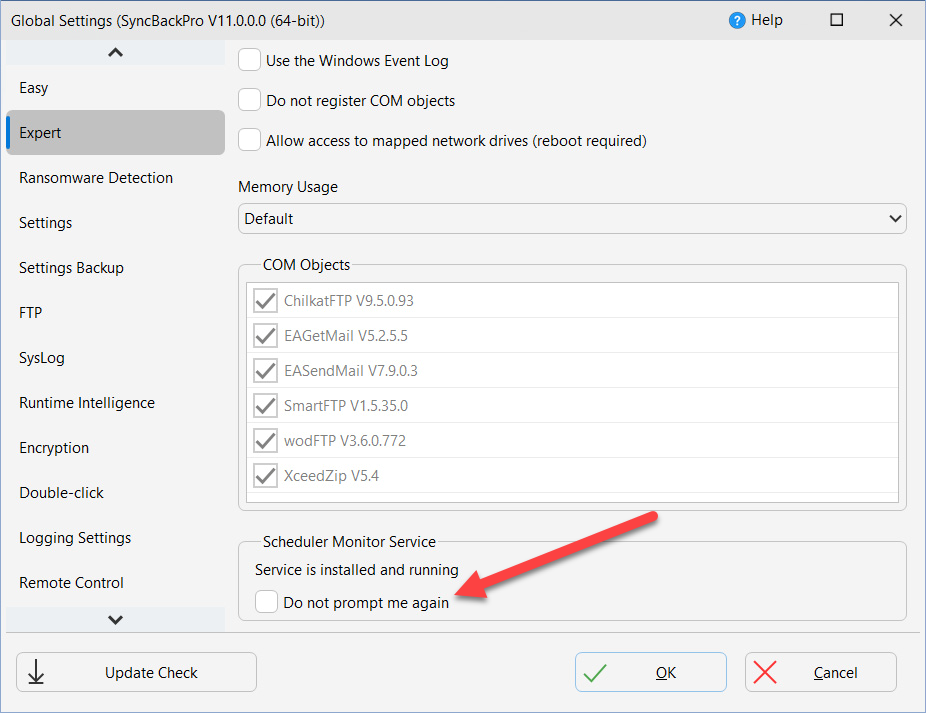
The Scheduler Monitor Service is installed with SyncBack if you are using the Administrator installer (install for All Users). It is not installed if you use the standard user installer (for the current user only) because Windows requires you to be an Administrator to install Windows Services. You can check if the service is installed and running by visiting the Expert settings page in Global Settings. If you do not want the service to inform you of problems then enable the option Do not prompt me again:
How It Works
The Scheduler Monitor Service is a Windows service that runs silently in the background. When you schedule a profile in SyncBack it informs the service of when the profile should next run, and when the Windows Task Scheduler runs the profile, SyncBack informs the service that it has been run. This way, if a scheduled task has not been run at the expected time, the service can inform SyncBack, which will then prompt the user:
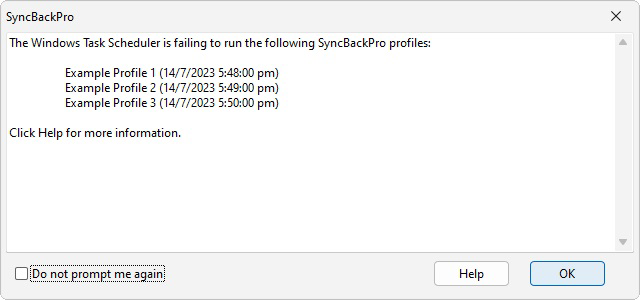
The date & time is when the scheduler was supposed to run the profile but it did not. Keep in mind that the scheduler may succeed in running it at a later time (while this window is being displayed), but this will not be reflected in this window (i.e. it is not updated). You can then investigate why the profile was not run by the Windows Task Scheduler (click the Help button for details). If you never want to be prompted again then you can tick the Do not prompt me again checkbox. This can be reset on the Expert settings page in Global Settings (see above).
Note that the monitor service is Windows user specific and you must log into Windows to receive the notification. If you have multiple users on the computer then it will only inform the appropriate user. After you log into Windows, the service will wait 12 minutes before notifying you of any failed profiles. This is to give the Windows Task Scheduler time to run any schedules it has missed (which typically takes at least 10 minutes), e.g. because the computer was powered down at the time.
There are other methods to be notified when a profile is run, e.g. email, webhook, Pushover, SysLog, etc. Please keep in mind that if a profile is not run by the Windows Task Scheduler then it will not send an email, for example, because SyncBack will not have even been called. For this reason you should configure your profile to always send an email, for example, as that way you will know if it has not run as you will not receive an email. The Scheduler Monitor is designed to notify you when a profile has not been run by the Windows Task Scheduler, where as the other methods (email, webhook, Pushover, SysLog, etc.) notify you when a profile has been run (not necessarily by the Windows Task Scheduler, e.g. it could have been run manually).
Caveats
There are cases where you will not be notified of a missed schedule:
- The Scheduler Monitor Service waits for at least 12 minutes after the user logs in before checking if scheduled tasks have been missed. This means if you log in and out in less than 12 minutes then you will not be notified of any missed schedules.
- If you have multiple schedules for the same profile then the result is undefined.
- If you schedule a group, and a profile is part of that group, and the profile itself also has its own schedule, then you would only be notified of failure if both schedules failed.
- By default, the Windows Task Scheduler will try to run a scheduled task as soon as possible if a scheduled start is missed. For example, if a scheduled task is to run at 1pm, but your computer is physically powered off at the time, then it will run try to run it when you next start Windows, e.g. you switch on the computer at 2pm. By default, there is a 10 minute delay before it tries. This means it is possible that the Scheduler Monitor Service will correctly inform you that a profile was not run. However, the Windows Task Scheduler may start the task while the warning is displayed (or up to 10 minutes after).
Why Scheduled Tasks May Not Run
There are a number of possible reasons why a scheduled task may not run be run by the Windows Task Scheduler:
- Check to see what error message is returned from the Windows Task Scheduler. On Windows 10 you can do this by Start > Windows Administrative Tools > Task Scheduler. For Windows 11, click the Start button and type Task Scheduler to find it and then click it. Expand the tree on the left so it is Task Scheduler (Local) > Task Scheduler Library > 2BrightSparks > SyncBack > [your username].
- You must use your Windows login password. You cannot use your login PIN or Windows Hello. It must be your Windows login password. This is a requirement of Windows, not SyncBack.
- If you change your Windows login password then you must remember to change the password for your scheduled tasks. You only need to update the password for one schedule. Windows will automatically update the password for all other scheduled tasks using the same Windows account.
- You are using the wrong username and/or password. You must use your Windows login password.
- The scheduled task may not be set-up correctly to wake the computer if it is hibernating or in standby mode. You may need to configure your computers BIOS to enable the computer to be woken (refer to the documentation for your computer).
- The scheduled task may have the option Start the task only if the computer is on AC power enabled (which is the default) and your computer (notebook, laptop, etc.) may be using batteries and not mains power.
- Although it is unlikely, the Windows Task Scheduler may be stopped or not installed. See your Windows documentation for details on how to start or install it.
- Profiles are user specific, they are not visible to every user on the computer. This means when you create a profile under a Windows username, and logout and login as a different Windows user, then you will not see the profile created as the other user. When scheduling a profile make sure your scheduled task is being run as the user who created the profile (this is the default when new schedules are created).
- If you are a member of a domain check that the correct username is being used for the scheduled task. By default your local (machine) username may be used, but it may be that you must use your domain username (domain\username).
- You should also make sure the user account has the necessary Windows user rights. To do this, run the Local Security Policy control panel applet (in the Administrative Tools section of the control panel). If you are using the home version of Windows then you may not have access to the Local Security Policy control panel applet (Microsoft have removed the feature from home versions of Windows). Make sure that the user account has the following user rights: Act as part of the operating system, Log on as a batch job, Log on as a service. Make sure the user account is not listed in the following user rights: Deny logon as a batch job, Deny logon as a service
Copying Locked Files Without Elevation (V12)
Copying locked files using the Volume Shadow Copy Service (VSS) normally requires SyncBack to be running elevated (as Administrator). This can be inconvenient, particularly for scheduled backups where you may not want the entire application running with elevated privileges.
In SyncBack V12, SyncBackPro and SyncBackSE can use the Scheduler Monitor Service to copy locked files even when running unelevated. Because the Scheduler Monitor Service runs as a Windows service with the necessary privileges, it can perform the VSS operations on behalf of the unelevated SyncBack process. This means your backups can copy locked files — such as Outlook PST files, database files, or system logs — without requiring you to run SyncBack as Administrator.
This feature requires the Scheduler Monitor Service to be installed and running, which means SyncBack must have been installed using the Administrator installer (for All Users).
Conclusion
The Scheduler Monitor Service serves two key purposes: notifying you if a scheduled task has not been run, and — in V12 — enabling locked file copying without requiring SyncBack to run elevated. It is designed to be as simple as possible to reduce the chance of failures.
Noted Customers
















© 2003-2026 2BrightSparks Pte. Ltd. | Home | Support | Privacy | Terms | Affiliate Program