A simulated run lets you preview exactly what SyncBackPro will do when a profile is run, without actually copying, moving, or deleting any files. It is a risk-free way to verify that a profile is correctly configured before using it with your real data.
|
Important: SyncBackPro copies, moves, and deletes data. You should always run a simulation before running a new or modified profile with your actual files. This is especially important for mirror and synchronize profiles, which can delete files. |

What a Simulated Run Does
During a simulated run, SyncBackPro performs the full scanning and comparison process just as it would during a real run. It examines the files in the source and destination, determines what has changed, and shows you the results in the Differences Window. The key difference is that no files are actually copied, moved, or deleted. Everything else, including the scanning, comparison, and log file creation, proceeds as normal.
This means you can see:
•Which files would be copied from the source to the destination (or in both directions for synchronize profiles)
•Which files would be replaced or overwritten
•Which files would be deleted (for mirror and synchronize profiles)
•Whether there are any collisions (files that have been changed in both the source and destination)
•Whether your file filters and selections are working as expected
How to Start a Simulated Run
There are several ways to start a simulated run:
From the Run Button
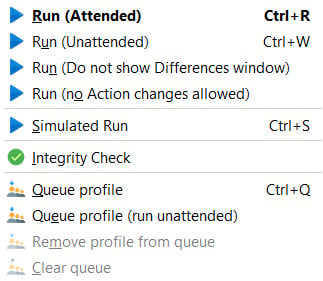
Select a profile in the main window, then click the drop-down arrow on the Run button and choose Simulated Run:
From the Right-Click Menu
Right-click on a profile in the main window and select Simulated Run from the pop-up menu. The keyboard shortcut is Ctrl-S.
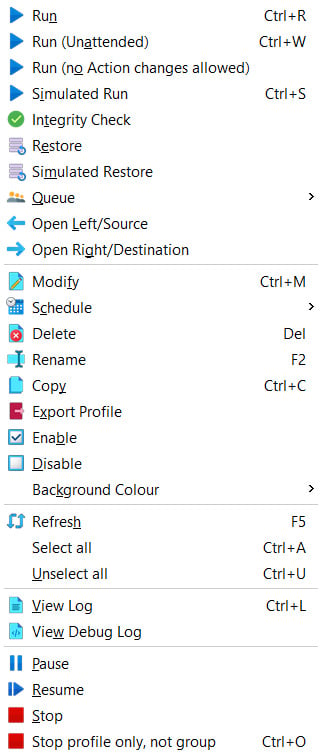
You can also start a simulated run with prompting by choosing Simulated Run (Prompted) from the right-click menu. This allows you to temporarily change certain profile settings before the simulation begins.
From the Command Line
You can also run a simulated run from the command line using the -s parameter.
Simulated Restore
Just as you can simulate a run, you can also simulate a restore. A Simulated Restore shows you what would happen if you restored files from a backup, without actually copying any files back. This is available from the drop-down menu on the Restore button or from the right-click menu.
A simulated restore is recommended before performing an actual restore, because a restore operation is not reversible and may not work in the way you expect. For example, some files in the backup may be older than the files currently on your computer.
Reading the Results
After a simulated run completes the initial scan, the Differences Window will appear. This window lists every file that would be affected, along with the action that would be taken (e.g. copy, replace, delete, skip). You can review the list and check that:
•The correct files are being included (and files you want excluded are not listed)
•The actions (copy, replace, delete, etc.) are what you expect
•No files are being unexpectedly deleted or overwritten
•Any collisions (shown in red) are handled appropriately
When you click Continue Simulation the simulation will complete and a log file will be created, just as it would for a real run. You can review this log afterwards to confirm everything is as expected.
When to Use a Simulated Run
You should use a simulated run:
•After creating a new profile - to confirm it is configured correctly before using it with your real files
•After modifying a profile - to verify that the changes you made produce the expected results
•Before a restore - to check which files will be restored and avoid unintended overwrites
•When using mirror or synchronize profiles - because these profile types can delete files, it is especially important to verify their behaviour
•When changing file filters or selections - to confirm that the right files are being included and excluded
All Content: 2BrightSparks Pte Ltd © 2003-2026