Advanced Logging is a highly configurable way to send logging information to external systems. You can choose what information you want sent to the logging system.
In the current version, the following systems are supported:
•Windows Event Log
•Text file
•Logstash Server
•HTTP REST Server
•SysLog Server
|
You must restart SyncBackPro if you change the Advanced Logging settings. |

Configuration
First, you must choose what format the log information will be in:
•JSON
•XML
•CSV
•Text (free-format)
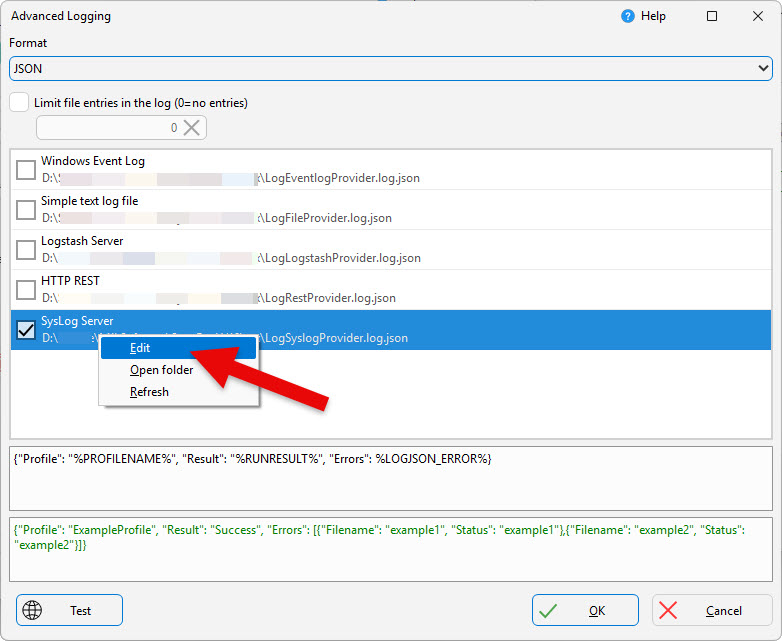
Next, choose the combined total of how many file entries you want. For example, the variable %LOGJSON_ERROR% contains a list of errors. You may not want to overload your logging system and so may only want to list 100 files in total. Keep in mind this is the combined total, so if you use %LOGJSON_COPIED%, %LOGJSON_WARNING%, etc. then the total number of file entries listed in all those variables combined cannot exceed this value. The order of files is undefined.
Most importantly, you need to define where the log details are going to be sent, e.g. a Logstash server. You can choose multiple destinations. If you right-click on an entry, and choose Edit from the pop-up menu, you can configure it. SyncBackPro uses QuickLogger for the Advanced Logging. See it for detailed information on the configuration settings.
The Simple text log file is mainly for testing. There may be locking issues, for example, using text logging. Do not use it in production.
Variables
You are free to define whatever information you want to send to your logging services. This can be a mix of free-format text and variables. The Advanced Log Variables section of this help file lists the special variables you can also use for this particular situation.
If you are using the JSON format, for example, then you will want to use the JSON advanced logging variables.
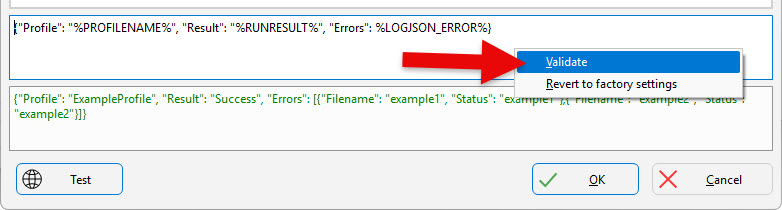
If you right-click on the edit box, you can select Validate to check for errors with your logging message.
All Content: 2BrightSparks Pte Ltd © 2003-2026