

How To Patch Files
Author: Debbie Grignani, 2BrightSparks Pte. Ltd.
Ever had to email large documents to your colleagues at work and found it a real hassle due to long download times? Well, you’re not alone. Email is one of the most popular forms of communication in this high-tech society and there is no more convenient a way to send documents than attaching them to your emails.
As easy as this may sound, there are times when sending a document could prove both time consuming and frustrating due to the document size. For example, Yahoo Mail only allows attachments if they are less than 10MB. Any documents larger than 10MB will have to either be manually divided into several files, or smaller sizes, or zipped using programs like WinZip to create a Zip file containing the actual document. The disadvantage of a creating a Zip file is that it still contains repetitive information that you would have emailed to your colleagues already. The alternative is to create a patch file.
What is a patch file?
A patch file is a text file that consists of a list of differences between the original file and the modified file. It is the best and easiest way to share changes to a document with friends and colleagues, without having to send repetitive information. This way, you can be sure that the file size you are emailing is kept to its bare minimum.
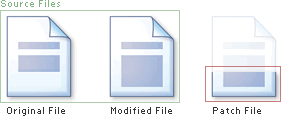
Think of the original file in the illustration on the next page as the reference file for creating patches. The modified file is the new file that is constantly being updated or changed. The patch file contains the differences between the original file and the modified file:
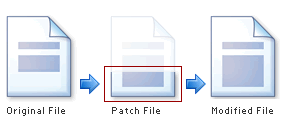
When you patch a file, you will also have the original reference file. By using the patch file, you will create a new patched file which is identical to the modified file:
Where can I find a patch program?
2BrightSparks introduced their OnClick Utilities, which is a collection of free and very useful programs that truly sum up the phrase “ease of use”. All programs are operational by a click of your mouse button, which explains the origin of the name “OnClick”.
Among the OnClick Utilities is one called PatchOnClick. It creates a patch file that will be easily attached to your emails and the recipient will be able to patch the file to the original file to get the whole updated document. It is that easy and convenient. Don't forget it's also free software.
Think of PatchOnClick the next time you need to send large documents that need constant amendments to and fro with your colleagues or friends. It will make your life a lot easier!
Noted Customers


















© 2003-2024 2BrightSparks Pte. Ltd. | Home | Support | Privacy | Terms | Affiliate Program